# Vector 21

{% hint style="info" %}
Introduced in **0.2.414**
{% endhint %}

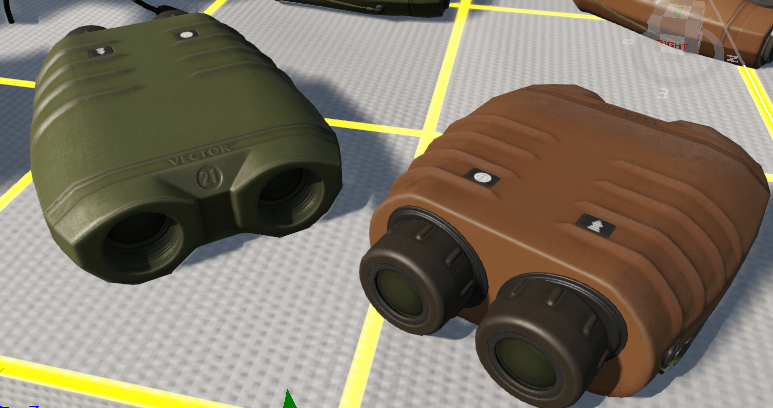
Vector 21 is a binocular rangefinder with day optics, an integrated 3-dimensional, 360° digital compass and a precise class 1 eye-safe laser rangefinder. It provides distance measurements up to 12 km with 7x magnification.

<figure><img src="/files/zttk3vtsr8RML5iZC5g0" alt=""><figcaption><p>Vector 21</p></figcaption></figure>

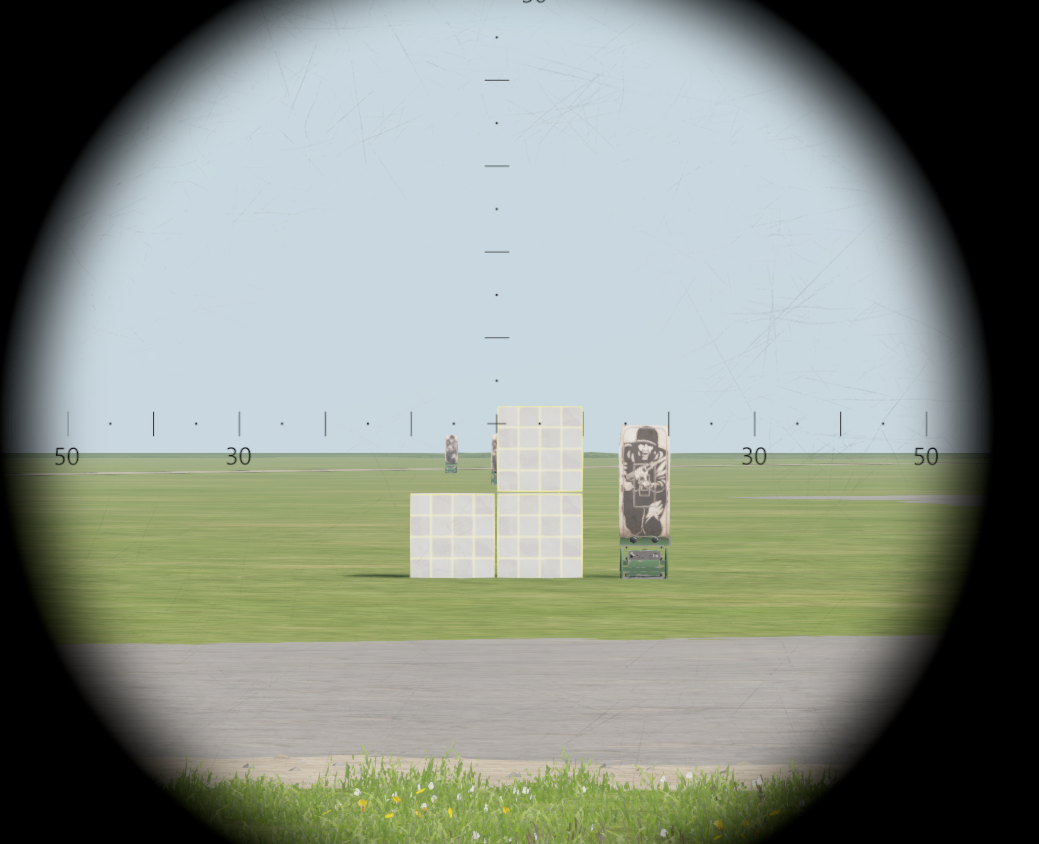
The engraved reticle has a line spacing of 10 mils and line-dot spacing of 5 mils. 1 mil corresponds to 1 m spacing at a distance of 1 km. In the image below you can see a 1 m cube being sighted at 100 m being exactly 10 mils.

<figure><img src="/files/UcuoCgKUii30tarm0dfG" alt=""><figcaption><p>Sighting of a 1 m wide cube at a distance of 100 m with Vector 21</p></figcaption></figure>

While looking through the binocular view you can perform the following actions:

| Keys                                                                                                                                                                                                                                                                                                                                                                                                                                                                                                                                  | Description                                                         | Examples                         |
| ------------------------------------------------------------------------------------------------------------------------------------------------------------------------------------------------------------------------------------------------------------------------------------------------------------------------------------------------------------------------------------------------------------------------------------------------------------------------------------------------------------------------------------- | ------------------------------------------------------------------- | -------------------------------- |
| Press and hold **`R`** key. Hold target for \~2 seconds in red targeting square. Release **`R`** key.                                                                                                                                                                                                                                                                                                                                                                                                                                 | Measures distance in meters to target.                              |                                  |
| Press and hold **`V`** key. Hold target for \~2 seconds in red targeting square. Release **`V`** key.                                                                                                                                                                                                                                                                                                                                                                                                                                 | Measures azimuth in degrees to target.                              |                                  |
| Press and hold **`R+V`** keys simultaneously. Hold target for \~2 seconds in red targeting square. Release **`R+V`** keys.                                                                                                                                                                                                                                                                                                                                                                                                            | Measures distance in meters and azimuth in degrees to target.       | ![](/files/n0iyjE1taO7O750kzQtg) |
| Press and hold **`R`**, tap **`C`** to mark first point, move to second point and release **`R`**                                                                                                                                                                                                                                                                                                                                                                                                                                     | Measure distance between 2 points.                                  | ![](/files/HD97TP0igzlPvogNGSql) |
| Tap **`R`** once, press and hold **`R`**, tap **`C`** to mark first point, move to second point and release **`R`**                                                                                                                                                                                                                                                                                                                                                                                                                   | Measure horizontal and vertical distance between 2 points.          | ![](/files/GvfENGGkEVbRTS6toEnV) |
| Tap **`V`** once, press and hold **`V`** for \~2 seconds and release.                                                                                                                                                                                                                                                                                                                                                                                                                                                                 | Measure azimuth and inclination to a point.                         | ![](/files/AaMFFG8Amhcowgb9CZfT) |
| Tap **`R`** once, press and hold **`R`** for \~2 seconds and release.                                                                                                                                                                                                                                                                                                                                                                                                                                                                 | Measure horizontal and vertical distance to a point.                |                                  |
| Press and hold **`V`**, tap **`C`** to mark first point, move to second and release **`V`**.                                                                                                                                                                                                                                                                                                                                                                                                                                          | Measure distance and azimuth between two objects.                   | ![](/files/ayM5d0pHV28AyMTbNIb2) |
| <p>Tap <strong><code>V</code></strong>, press and hold <strong><code>V</code></strong>, tap <strong><code>C</code></strong> to mark first point (original target), move to second (arty impact) and release <strong><code>V</code></strong>.<br><br>The results are displayed together with letters (A. - add, d. - drop, L. - left, r. - right) which indicate the necessary correction terms together with the distance.<br><br>Example: If a shot is left and short, the correction is r.. and A.. with the appropriate value.</p> | Measure fall of shot between target and arty impact for correction. | ![](/files/7Nf6cFaH14YerP8t2A2D) |

{% embed url="<https://youtu.be/BA-yZCkN32Q>" %}


---

# Agent Instructions: Querying This Documentation

If you need additional information that is not directly available in this page, you can query the documentation dynamically by asking a question.

Perform an HTTP GET request on the current page URL with the `ask` query parameter:

```
GET https://docs.rhsmods.org/rhs-status-quo-user-documentation/arma-reforger/rhs-status-quo/blufor/gadgets/vector-21.md?ask=<question>
```

The question should be specific, self-contained, and written in natural language.
The response will contain a direct answer to the question and relevant excerpts and sources from the documentation.

Use this mechanism when the answer is not explicitly present in the current page, you need clarification or additional context, or you want to retrieve related documentation sections.